|
|
| (242 intermediate revisions by 4 users not shown) |
| Line 1: |
Line 1: |
| − | HAMTV is the name of the Digital Amateur Television (DATV) transmitter on board the Columbus module of the International Space Station (ISS). | + | __NOTOC__ |
| | + | [[File:HAMTV 1.jpg|400px|right]] HAMTV is the name of the Digital Amateur Television (DATV) transmitter on board the Columbus module of the International Space Station (ISS). It is a DVB-S digital audio and video transmitter, normally on 2395MHz (13cm band). |
| | | | |
| − | It transmits Digital video and audio in MPEG-2 format using the DVB-S protocol in the 13cms band.
| + | The HamTV unit was first installed on the ISS in 2013, commissioned in April 2014 and was used for a number of ARISS school contacts in 2016 - 2018. |
| | + | The unit failed in 2019, and was brought back to earth for repair. It was returned to the ISS on the SpaceX SpX-30 flight on March 21st 2024. It was finally installed and first powered on again on 29th July 2025. |
| | | | |
| − | [[File:HAMTV 1.jpg|400px|]]
| + | == Purpose == |
| | | | |
| − | The original HamTV unit was installed on the ISS in 2013 and commissioned in April 2014 and was used for a number of ARISS school contacts in 2016 - 2018. | + | The primary use of HAMTV is for ARISS schools contacts, when the astronaut will use a camera to show live video of himself and the inside of the ISS to the school during the VHF radio contact. |
| − | | |
| − | The unit failed in 2019, and was returned to earth for repair. It is expected to be returned to the ISS on the SpaceX SpX-30 flight currently scheduled for March 21st 2024. It is hoped that it will be recommissioned by a visiting astronaut within a few weeks of its arrival.
| |
| − | | |
| − | | |
| − | ==HAMTV specifications==
| |
| − | | |
| − | ====Ham Video downlink frequencies====
| |
| − | *2395 MHz (main operating frequency)
| |
| − | *2369 MHz
| |
| − | *2422 MHz
| |
| − | *2437 MHz
| |
| − | | |
| − | ====DVB-S modulation====
| |
| − | *Symbol rates: 1.3 Ms/s or 2.0 Ms/s (2.0 Ms/s is normally used)
| |
| − | *FEC : ½
| |
| − | | |
| − | ====RF output====
| |
| − | The HAMTV transmitter produces 10 watts RF, however this is then fed through a series of interconnecting cables and bandpass filter before passing through the ISS Columbus module external wall. Estimated power at the antenna is ~ 2 watts.
| |
| − | | |
| − | ====HAMTV antenna====
| |
| − | The HamTV transmission runs relatively low power on 2395MHz to a simple patch antenna on the ISS.
| |
| − | | |
| − | [[File:HamTV patch.png|400px]]
| |
| − | | |
| − | This patch antenna is located on the earth facing side of the ISS but there are many other items that project below the antenna and may cause reflections. These include the solar panels, thermal radiator panels, sometimes, two or more visiting vehicles and robotic arms. Depending upon your location in respect to the ISS, these projections may result in strong reflected signals as well as the one from the patch antenna itself. They may cause disturbances to the signal level you receive.
| |
| − | | |
| − | The ISS also “flies” slightly nose down to protect the cupola windows from space debris and so the RF performance, particularly when it is rising from the west, is slightly unpredictable.
| |
| − | | |
| − | The transmissions are right hand circular polarised (RHCP)
| |
| − | | |
| − | ====Video format====
| |
| − | * MPEG-2, approx. 2 Mbits/s
| |
| − | * NTSC
| |
| − | * SIF resolution: 352×240 or D1:720×480, 29.97fps
| |
| − | * Note that non-square pixels are used, the 4:3 picture has to be stretched to 16:9 for correct visual aspect ratio.
| |
| − | | |
| − | ==What is HAMTV used for?==
| |
| − | | |
| − | The primary use is for ARISS schools contacts, when the astronaut will use a camera to show himself and the inside of the ISS during the VHF radio contact.
| |
| | | | |
| | [[File:HAMTV 2.jpg|400px]] | | [[File:HAMTV 2.jpg|400px]] |
| | | | |
| − | It is hoped in the future that test patterns, including JPEG images, will be transmitted when the cameras are not in use. Note this will NOT happen when HAMTV is recommissioned in Spring / Summer 2024.
| + | Outside of school contacts the transmitter is often left switched on to enable experimentation and self-education in the building of ground stations. |
| − | | |
| − | ==When will HAMTV be "on the air"?==
| |
| − | | |
| − | Once commissioned it is unlikely that the HamTV transmitter will be on air 24/7.
| |
| − | | |
| − | During the first flight on the ISS between 2014 and 2018 it was used primarily for ARISS schools contacts but transmitter was left on at other times but no video was transmitted. This did allow ground stations to test their receive equipment and it is hoped a test signal generator will eventually be included, perhaps in 2025.
| |
| − | | |
| − | Once re-commissioned, it will be tested before school contacts are undertaken.
| |
| − | | |
| − | HamTV will be added to the AMSAT status page https://www.amsat.org/status/ - always check there before doing any receive tests.
| |
| − | | |
| − | =How to receive HAMTV?=
| |
| − | | |
| − | There are a number of challenges to receive HAMTV from the ISS and a typical ground station is made up of the following elements
| |
| − | | |
| − | A typical groundstation system block diagram
| |
| − | | |
| − | ===Ground station antenna and feed===
| |
| − | | |
| − | The HamTV transmission runs relatively low power on 2395MHz to a simple patch antenna on the ISS.
| |
| − | | |
| − | [[File:dish.jpg|400px]]
| |
| − | | |
| − | This means an antenna with reasonable gain is required to receive the signal and whilst it is possible to receive the signal on a simple antenna when the ISS is overhead, to enable more than 5 minutes of reception, a higher gain antenna such as a dish with an efficient feed system is required.
| |
| − | | |
| − | The transmission is RHCP, so the feed on a dish will need to be LHCP. A suitable helical design for deep dishes was described by G3RUH here https://www.amsat.org/amsat/articles/g3ruh/116.html
| |
| − | | |
| − | It will be difficult to receive HamTV DATV picture when ISS is at a low elevation at your ground station location. Generally, a minimum of 20 degrees elevation is required to begin receiving DATV pictures.
| |
| − | | |
| − | A 1 meter or larger dish is optimum but smaller antennas such as flat plate or patch antennas will work and have the advantage of a wider beamwidth making it easier to track the ISS. They are unlikely to work at low elevations.
| |
| − | | |
| − | ===Pre-amp and filter===
| |
| − | | |
| − | A low noise pre-amp (LNA) with bandpass filter tuned to 2395MHz should be connected directly to the antenna feed point to minimise co-ax losses. The LNA should have noise figure (NF) less than 1db and a gain of at least 15 dB.
| |
| − | | |
| − | Note that 2395MHz is only 5MHz below the 2.4GHz WiFi Channel 1, so good filtering will be needed to prevent strong, local WiFi signals from getting into the wide band satellite tuner and causing interference or defense.
| |
| − | | |
| − | ===Receive co-ax cable===
| |
| − | | |
| − | It is recommended to use professional grade satellite co-ax. If you are using a long cable run you must check the received signal level at the receiver - see below.
| |
| − | | |
| − | ===Receive Line amplifier===
| |
| − | | |
| − | Satellite TV receivers need a high level of RF signal - they are designed for use with satellite LNBs which have ~55dB gain. Your masthead pre-amp must be followed by at least one satellite TV line amplifier with greater than 30 dB gain in the shack.
| |
| − | | |
| − | [[File:Inline sat amp-800x800.jpg|200px]]
| |
| − | Your masthead LNB MUST have enough gain to overcome your co-ax cable loss. The satellite line amplifier can be placed at masthead if needed to help overcome the feeder loss or in the shack.
| |
| − | | |
| − | You can check if you have enough gain in your receive system by checking the RF signal level on the Ryde, OpenTuner, MiniTiouner or Portsdown DATV receivers - the noise floor should sit between -30 to -70dBm when not receiving any signals.
| |
| − | | |
| − | If you are powering the LNA at masthead up the co-ax, you will need to place the DC inserter AFTER the filter.
| |
| − | | |
| − | ===Do I need a downconverter?===
| |
| − | | |
| − | The HAMTV frequency on 2395MHz is outside the frequency range of a standard consumer set top box or satellite tuner.
| |
| − | | |
| − | Unless you are using the BATC MiniTiouner Mark 2 or PicoTuner USB receiver equipped with the Serit 4434 NIM, which can tune up to 2450MHz, you will need a frequency down converter to place the HAMTV signal between 950 and 2150MHz which is within the range of a standard satellite receiver.
| |
| − | | |
| − | Note: The MiniTiouner Mk1 PCB with a Sharp or Eardertek tuner does NOT cover 2395MHz and will require a downconverter.
| |
| − | | |
| − | The downconverter should be placed between the low noise amplifier and satellite receiver – placing it at the masthead will mean that lower grade feeder can be used to bring the IF signal back to the shack.
| |
| − | | |
| − | Previous suppliers of suitable downconverters, such as Kuhne Electronics, no longer market suitable items and BATC '''strongly recommends''' purchasing a new USB tuner hardware kit using the Serit 4334 tuner rather than building or sourcing a down converter - see next section on HamTV receivers.
| |
| − | | |
| − | ==Digital receivers for HAMTV==
| |
| − | | |
| − | The HamTV transmissions can be received using a DVB-S receiver capable of decoding 2 Msymbol / second MPEG2 transmission. This means that a standard consumer Set Top Box (STB) can be used. However, because the signal is only available during the ISS pass it is essential to use a receiver that can be set to both the frequency and symbol rate before the pass.
| |
| − | | |
| − | A receiver, such as a typical consumer STB, that needs to scan the frequency is unlikely to lock to the signal in the time available during the pass. This solution is therefore not recommended.
| |
| − | | |
| − | ===Receivers designed for DATV===
| |
| − | | |
| − | For optimum performance, a receiver designed for receiving narrow band DATV signals should be used. The Amateur TV community has developed a number of receive solutions based around a USB connected tuner hardware.
| |
| − | | |
| − | ===Hardware===
| |
| − | | |
| − | The BATC Minitiouner and PicoTuner are PCBs which host the Serit 4334 satellite tuner and a USB interface. This unit is designed to be built at home, requiring only intermediate skills and does not use surface mount components.
| |
| − | | |
| − | [[File:Serit complete.jpg|300px]]
| |
| − | | |
| − | The hardware is connected to either a PC or Raspberry Pi 4 using the USB 2 connection.
| |
| − | | |
| − | As mentioned above, the original BATC MiniTiouner Mk1 PCB launched in 2015 with a Sharp or Eardertek tuner does NOT cover 2395MHz and will require a downconverter. As well as covering the HAMTV frequency without a down converter, the Serit 4334 has much better RF performance than the original Sharp and Eardertek units and has been integrated into the OpenTuner and Portsdown DATV receive systems.
| |
| − | | |
| − | Full details of the USB tuner hardware, including parts list and construction details are available here: [[MiniTiouner hardware Version 2]]
| |
| − | | |
| − | ===Software for use with the USB receiver===
| |
| − | When the original HamTV was on the air, due to a problem with the DVB tables in the transmission, the MiniTiouner software by F6DZP running on Windows had to be used.
| |
| − | | |
| − | However, during the last few years many developments have taken and so we now have a choice of software to use with the USB tuner hardware:
| |
| − | | |
| − | | |
| − | * '''Ryde''' - Raspberry Pi 4 based set-top box software designed specifically for receiving narrow band DATV signals.
| |
| − | | |
| − | [[File:Ryde_With_Menu_Small.jpg|300px]]
| |
| − | | |
| − | For more details see this page:[[Ryde Receiver]]
| |
| − | | |
| − | | |
| − | * '''Opentuner''' - PC based software developed by Tom ZR6TG
| |
| − | | |
| − | [[File:OT1.png|300px]]
| |
| − | | |
| − | For more details see this wiki page: [[OpenTuner]]
| |
| − | | |
| − | * '''Portsdown''' - The BATC designed DATV transceiver system based on a Rpi 4 has a receiver which has been tested and decodes the HAMTV signal
| |
| − | | |
| − | [[File:Pdown rxr.jpg|300px]]
| |
| − | | |
| − | | |
| − | See [[The_Portsdown_DATV_transceiver_system#Portsdown_DATV_receiver]]
| |
| − | | |
| − | * '''MiniTiouner''' - the MiniTiouner software is still available however the author F6DZP is no longer involved in the amateur radio community so is not providing support or enhancements and you can no longer register on the Viva DATV forum to download the software.
| |
| − | | |
| − | | |
| − | [[File:20160507 Walbury GW8VPG.jpg|300px]]
| |
| − | | |
| − | ===PC software receivers===
| |
| − | | |
| − | SDR Angel is PC software that receives DATV signals using SDR hardware such as the ADALM Pluto and Hack RF - at this time we do not have any experience of using SDR Angel to receive HamTV.
| |
| − | For more details see https://www.sdrangel.org/
| |
| − | | |
| − | =Receiving the Signal=
| |
| | | | |
| − | First - always check the HamTV transmitter status before attempting to align your system as it is unlikely that it will be left on 24/7 and it certainly will not be available when EVAs (space walks) and docking of space craft are happening.
| + | == Transmission Details == |
| | | | |
| − | It is likely but not confirmed that the status will be published on the ARISS international website and Twitter account – the ISSfanclub website may also have the status updates.
| + | Whilst the transmitter has a number of possible configurations, it is anticipated that most transmissions will be: |
| | | | |
| − | [[File:Amsat status.png|500px]]
| + | * 2395 MHz, RHCP, 2W power at the patch antenna pointing down from the ISS. |
| | + | * Modulation: 2.0 Msymbols/second, DVB-S (QPSK), FEC 1/2 |
| | + | * Content: MPEG-2 video with MP2 audio. |
| | | | |
| − | https://www.amsat.org/status/
| + | '''More details can be found at: [[HAMTV from the ISS - HAMTV Transmitter Information]]''' |
| | | | |
| − | ==Tracking the ISS== | + | == How can I watch HAMTV? (without a ground station) == |
| − | Perhaps the most challenging aspect of receiving HamTV is that, unlike the QO-100 satellite available in the Europe and Africa, the ISS is not geo-stationary and orbits the earth every 96 minutes and is visible at any location for a maximum of 11 minutes.
| |
| | | | |
| − | In order to track the ISS, an azimuth and elevation rotator system is required. The most commonly used system is the Yaesu G5500, which is capable of rotating a 1.2m dish with a 5 degree beam width to track the ISS. When choosing/designing your system remember the ISS does go north of 50 degrees and so any system will need to be capable of flip mode to track it when it goes overhead.
| + | A network of ARISS ground stations contribute to a central feed using the BATC Merger to enable high-quality reception for School Contacts. You can watch the video output whenever ground stations are receiving the signal. |
| | | | |
| − | Just like for other spacecraft in low earth orbit, software is available to control the rotator system – there are a number of different programs available. PSTrotator which is a very versatile system with almost unlimited number of interfaces to control rotators is one of them..
| + | '''ARISS / BATC HAMTV Ground Station Network: https://live.ariss.org/hamtv/''' |
| | | | |
| − | ==Testing your system== | + | == How can I build my own ground station to receive HAMTV? == |
| | | | |
| − | As the ISS is only above your horizon for short periods, it will be difficult to see if your HAMTV receive system is working.
| + | Building a ground station to receive HAMTV from the ISS is challenging. |
| | | | |
| − | There are a number of tests you can do to ensure your system is optimised but the most useful is to measure the sun noise received on your system. This will not only measure your system performance but if you leave it running for a few hours with your rotator control system set to track the sun, it will confirm the accuracy of your tracking system.
| + | The link budget is a lot less forgiving of non-optimal stations than VHF/UHF, the high 'microwave' frequency brings lots of pitfalls, the equipment can be expensive and/or hard to source, and the limited visibility and fast movement of the space station across the sky can make it time-consuming and frustrating to troubleshoot any problems that occur. |
| | | | |
| − | ===Measuring sun noise===
| + | The result however is being able to receive live video from an Astronaut (during school contacts), with your own S-band ground station! You could also talk to ARISS Ops about joining the ground station network and using your antenna to contribute directly to School Contacts. |
| − | ====Portsdown DATV test system====
| |
| − | The Portsdown DATV transceiver incorporates a test function that has a continuous noise measurement facility designed to measure sun noise. It is very easy to use. Simply connect the signal from your LNA to the rx port on a Lime SDR and run the software - see [[Portsdown_Noise_Meter|https://wiki.batc.org.uk/Portsdown_Noise_Meter]] | |
| | | | |
| − | [[File:Noise_Meter.png|400px]]
| + | === Components of a typical ground station === |
| | | | |
| − | ====SDR continuum mode====
| + | * Antenna - Typically a dish of 0.6-1.2 meters in diameter, with a helix or patch feed. |
| − | Measuring sun noise can be done using SDR software running in continuum mode and running a program such as spectra view on the audio output – a Google search for sun noise measurement will show several techniques.
| + | * Pointing Mechanism - to follow the ISS across the sky. Can be motorised, or manual for smaller antennas. |
| | + | * LNA - Required, and mounted as close as possible to the antenna feed to minimise coax loss at microwave frequencies. |
| | + | * Filter - May be required to prevent overload if you have strong WiFi (2400MHz+) or 5G (2380MHz-) nearby. |
| | + | * Downconverter - Optional, allows use of non-microwave capable receivers, also reduces loss in long coax runs. |
| | + | * Receiver - Needs to be capable of receiving 2.4MHz-wide DVB-S. A good receiver can be more tolerant of issues elsewhere in the ground station. |
| | | | |
| − | ====MiniTiouner Noise power measurement====
| + | '''For more information read: [[HAMTV from the ISS - How to build a ground station]]''' |
| − | F6DZP developed a suite of programs to help test a HamTV receive system which included a Noise Power Measurement program (see CQ-TV253 page 27 for more details). This was available as part of the MiniTiouner v0.8 package but appears to have been dropped in later releases. The program can be used to measure the noise power received by a Serit 4334 tuner over a period of time and requires no extra software or equipment to make sun noise measurements – the picture shows the sun noise recording from a RFHams 1.2 m mesh dish used to receive HamTV for the Principia mission in 2016.
| |
| | | | |
| − | [[File:NPM.JPG|400px]]
| + | == Can I help support HAMTV downlinks for ARISS Educational Contacts? == |
| | | | |
| − | ===Decoding a local signal===
| + | To assist our volunteer teams with providing a reliable HAMTV experience for the participants at Educational Contact events, a Ground Station Merger facility has been developed to crowd-source the HAMTV data in realtime from geographically diverse ground stations. |
| − | Once you have checked your system sun noise and tracking accuracy it is worth testing you’re your system can receive a locally generated 2Ms DVB-S signal on 2395 MHz. You can use the Portsdown Pi4 based system with a Lime SDR to generate this signal.
| |
| | | | |
| − | If this is successful you should be set to receive HamTV!
| + | Before getting involved you'll need to have a reliable station up and running, however there are also some requirements on the equipment involved that can be found at the link below. |
| | | | |
| − | ==Receiving HamTV==
| + | '''[[HAMTV from the ISS - How to contribute to the ARISS Merger]]''' |
| − | All that remains is to wait until it is confirmed that the HamTV transmitter has been turned on then set your tracking program to follow the ISS and wait for the magic signs on the spectrum display (BandViewer?) or lock indicator that you are receiving the signal!
| |
| | | | |
| − | Once you have successfully received the HamTV transmission, the Dsave button in MiniTioune can be used to record data such as RF level, MER and Vber to show how well and for how long you received the pass.
| + | =Social media= |
| | | | |
| − | ==Further information==
| + | ARISS international on Twitter/X: https://twitter.com/ARISS_Intl |
| | | | |
| − | BATC have setup a new forum thread to discuss receiving HamTV. Please post any questions, comments and status updates here:
| + | ARISS International on Bluesky: https://bsky.app/profile/arissintl.bsky.social |
| | | | |
| − | https://forum.batc.org.uk/viewtopic.php?f=2&t=8398 | + | Join and ask questions in the ARISS Discord: https://discord.gg/dQUEE48C |
| | | | |
| − | Receivers compatible with HamTV:
| + | ==BATC forum== |
| | | | |
| − | [[Ryde_Receiver|Ryde Receiver]]
| + | BATC have setup a new forum thread to discuss receiving HamTV. |
| | | | |
| − | [[DVB-S/S2_Reception|Portsdown DATV transceiver]]
| + | Please post any questions, comments and status updates here: https://forum.batc.org.uk/viewtopic.php?f=2&t=8398 |
| | | | |
| − | [[MiniTioune|MiniTioune]]
| + | A lot of information is available on the BATC forum: https://forum.batc.org.uk/viewtopic.php?t=4389 |
| | | | |
| − | A lot of information is available on the BATC forum:
| + | == Relevant Presentations and Video == |
| | | | |
| − | https://forum.batc.org.uk/viewtopic.php?t=4389 | + | Colin G4KLB on how he received HamTV in 2014: [https://www.youtube.com/watch?v=9keVA21DPBc YouTube] |
| | | | |
| − | Colin G4KLB made a video on how he received HamTV
| + | Video of HamTV in action during the Tim Peake Principia mission contact with Norwich schools in 2016: [https://youtu.be/DnJmxNCX4V4?si=RySuD0ft1Bcl1nTN YouTube] |
| | | | |
| − | https://www.youtube.com/watch?v=9keVA21DPBc | + | G8GTZ on receiving HAMTV at the AMSAT UK conference in October 2023: [https://www.youtube.com/watch?v=4J_JA3Syv6Y YouTube] |
| | | | |
| − | ==BATC TS (transport stream) merger system== | + | Next generation HamTV presentation by Phil M0DNY at the AMSAT UK conference in October 2023: [https://www.youtube.com/watch?v=MQvRdG1FBo4 YouTube] |
| | | | |
| − | Once HamTV is active from ISS, BATC will be running the TS merger system. This is a server which combines the UDP outputs from several ground stations and enables continuous video stream from the ISS to be presented to a web page.
| + | HamTV Ground Stations presentation by Phil M0DNY in October 2024: [ YouTube (coming soon)] [https://wiki.batc.org.uk/images/c/cd/M0DNY_-_HAMTV_-_AMSAT-UK_2025.pdf Slides] |
| | | | |
| − | It typically gives 25 mins of continuous video over Europe and we will be looking for ground stations to join the network.
| + | ==Comments on this wiki page== |
| | | | |
| − | [[File:TSmerger.png|600px]]
| + | If you have any comments on this wiki page or if you think we should add more information to it, please email them to wiki @ batc.tv |
HAMTV is the name of the Digital Amateur Television (DATV) transmitter on board the Columbus module of the International Space Station (ISS). It is a DVB-S digital audio and video transmitter, normally on 2395MHz (13cm band).
The HamTV unit was first installed on the ISS in 2013, commissioned in April 2014 and was used for a number of ARISS school contacts in 2016 - 2018.
The unit failed in 2019, and was brought back to earth for repair. It was returned to the ISS on the SpaceX SpX-30 flight on March 21st 2024. It was finally installed and first powered on again on 29th July 2025.
Purpose
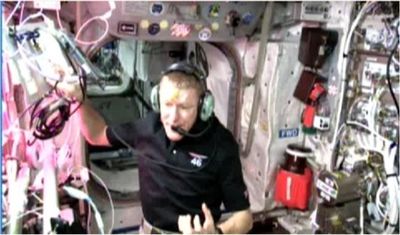
The primary use of HAMTV is for ARISS schools contacts, when the astronaut will use a camera to show live video of himself and the inside of the ISS to the school during the VHF radio contact.
Outside of school contacts the transmitter is often left switched on to enable experimentation and self-education in the building of ground stations.
Transmission Details
Whilst the transmitter has a number of possible configurations, it is anticipated that most transmissions will be:
- 2395 MHz, RHCP, 2W power at the patch antenna pointing down from the ISS.
- Modulation: 2.0 Msymbols/second, DVB-S (QPSK), FEC 1/2
- Content: MPEG-2 video with MP2 audio.
More details can be found at: HAMTV from the ISS - HAMTV Transmitter Information
How can I watch HAMTV? (without a ground station)
A network of ARISS ground stations contribute to a central feed using the BATC Merger to enable high-quality reception for School Contacts. You can watch the video output whenever ground stations are receiving the signal.
ARISS / BATC HAMTV Ground Station Network: https://live.ariss.org/hamtv/
How can I build my own ground station to receive HAMTV?
Building a ground station to receive HAMTV from the ISS is challenging.
The link budget is a lot less forgiving of non-optimal stations than VHF/UHF, the high 'microwave' frequency brings lots of pitfalls, the equipment can be expensive and/or hard to source, and the limited visibility and fast movement of the space station across the sky can make it time-consuming and frustrating to troubleshoot any problems that occur.
The result however is being able to receive live video from an Astronaut (during school contacts), with your own S-band ground station! You could also talk to ARISS Ops about joining the ground station network and using your antenna to contribute directly to School Contacts.
Components of a typical ground station
- Antenna - Typically a dish of 0.6-1.2 meters in diameter, with a helix or patch feed.
- Pointing Mechanism - to follow the ISS across the sky. Can be motorised, or manual for smaller antennas.
- LNA - Required, and mounted as close as possible to the antenna feed to minimise coax loss at microwave frequencies.
- Filter - May be required to prevent overload if you have strong WiFi (2400MHz+) or 5G (2380MHz-) nearby.
- Downconverter - Optional, allows use of non-microwave capable receivers, also reduces loss in long coax runs.
- Receiver - Needs to be capable of receiving 2.4MHz-wide DVB-S. A good receiver can be more tolerant of issues elsewhere in the ground station.
For more information read: HAMTV from the ISS - How to build a ground station
Can I help support HAMTV downlinks for ARISS Educational Contacts?
To assist our volunteer teams with providing a reliable HAMTV experience for the participants at Educational Contact events, a Ground Station Merger facility has been developed to crowd-source the HAMTV data in realtime from geographically diverse ground stations.
Before getting involved you'll need to have a reliable station up and running, however there are also some requirements on the equipment involved that can be found at the link below.
HAMTV from the ISS - How to contribute to the ARISS Merger
Social media
ARISS international on Twitter/X: https://twitter.com/ARISS_Intl
ARISS International on Bluesky: https://bsky.app/profile/arissintl.bsky.social
Join and ask questions in the ARISS Discord: https://discord.gg/dQUEE48C
BATC forum
BATC have setup a new forum thread to discuss receiving HamTV.
Please post any questions, comments and status updates here: https://forum.batc.org.uk/viewtopic.php?f=2&t=8398
A lot of information is available on the BATC forum: https://forum.batc.org.uk/viewtopic.php?t=4389
Relevant Presentations and Video
Colin G4KLB on how he received HamTV in 2014: YouTube
Video of HamTV in action during the Tim Peake Principia mission contact with Norwich schools in 2016: YouTube
G8GTZ on receiving HAMTV at the AMSAT UK conference in October 2023: YouTube
Next generation HamTV presentation by Phil M0DNY at the AMSAT UK conference in October 2023: YouTube
HamTV Ground Stations presentation by Phil M0DNY in October 2024: [ YouTube (coming soon)] Slides
If you have any comments on this wiki page or if you think we should add more information to it, please email them to wiki @ batc.tv

